

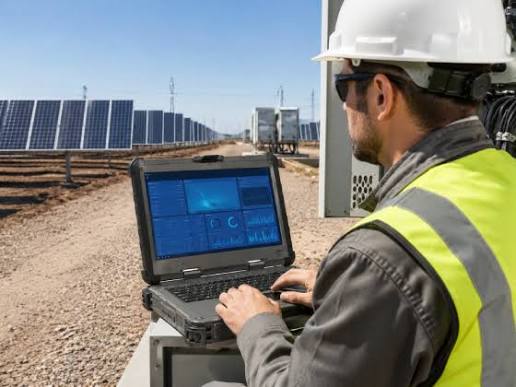
How Rugged Laptops Support Reliable Work in Demanding Environments
Mobile technology has changed how organizations manage inspections, maintenance, logistics, emergency response, and field operations. However, conventional computers are not always designed for dust, moisture, vibration, accidental drops, or changing temperatures. A purpose-built rugged laptop gives professionals access to important software and information while working in conditions that could damage an ordinary consumer device.
Why Standard Laptops May Struggle in the Field
Most standard laptops are designed for homes, offices, classrooms, and other controlled settings. Their ports, screens, keyboards, internal components, and outer casings may offer limited protection against environmental exposure.
Field workers face very different conditions. A technician may need to enter data beside heavy machinery, while a utility worker may use a computer outdoors during rain or intense sunlight. Construction supervisors often carry devices through areas containing dust, debris, vibration, and uneven surfaces. Even a minor fall from a vehicle seat or workbench can interrupt operations if the computer is not built to withstand it.
Damage does more than create a repair expense. It can delay inspections, restrict access to job records, interrupt customer service, and prevent employees from submitting time-sensitive reports. Selecting hardware that matches the working environment can reduce these risks.
What Makes a Laptop Rugged?
A rugged laptop is built with additional physical protection around its internal components. Depending on the model and ruggedness level, it may include a reinforced casing, sealed ports, a spill-resistant keyboard, shock-mounted storage, and a screen that remains readable outdoors.
Rugged devices are commonly divided into semi-rugged, fully rugged, and ultra-rugged categories. Semi-rugged computers may suit vehicle-based teams and light industrial work. Fully rugged models are intended for regular use in harsher field conditions. Ultra-rugged systems are generally selected for severe settings where exposure to water, dust, vibration, or temperature changes is expected.
Buyers should not rely on the word “rugged” alone. Product specifications, environmental ratings, testing standards, and warranty conditions provide a clearer picture of what a particular device can withstand.
Features That Matter in Demanding Workplaces
Durability is important, but it is not the only consideration. The computer must also support the employee’s daily tasks.
Outdoor screen visibility can be essential for workers who need to read maps, diagrams, forms, or diagnostic information in direct sunlight. A touchscreen that works with gloves may benefit technicians, warehouse teams, and emergency personnel. Long battery life or hot-swappable batteries can help users complete extended shifts without stopping to recharge.
Connectivity also deserves attention. Field teams may need Wi-Fi, Bluetooth, cellular connectivity, GPS, serial ports, or other connections for specialized equipment. The correct combination depends on the software, machinery, vehicles, and communication systems already in use.
Performance requirements should be assessed as carefully as physical protection. Mapping applications, engineering programs, diagnostic tools, and large databases may require more processing power and memory than basic reporting software.
Industries That Rely on Rugged Computing
Rugged laptops serve organizations across a broad range of sectors. Construction teams use them to review plans, record site progress, and manage safety documentation. Manufacturing employees may connect them to machinery for diagnostics, programming, and maintenance.
Utility companies use rugged computers during infrastructure inspections and repair work. Logistics and transportation teams depend on them for route management, inventory records, and vehicle diagnostics. Police, fire, and emergency medical personnel may use vehicle-mounted or portable systems to access dispatch information and complete reports.
Mining, agriculture, telecommunications, aviation, and defense operations also require computers that can function beyond a conventional office. Although the working conditions differ, these industries share a need for dependable access to information.
The Business Case for Rugged Hardware
Rugged computers often cost more initially than consumer laptops. A fair comparison should consider the total cost of ownership rather than the purchase price alone.
Frequent repairs, replacement devices, lost working hours, data recovery, and disrupted assignments can make unsuitable hardware expensive over time. A rugged device that remains functional for longer may reduce these indirect costs.
Device consistency can also help IT teams. When computers are selected according to job requirements, organizations can establish clearer deployment, maintenance, security, and replacement procedures. Employees are less likely to create makeshift ways to protect equipment or postpone digital reporting because they fear damaging a device.
Choosing the Right Rugged Laptop
Before selecting a model, organizations should document where and how the computer will be used. Relevant questions include:
- Will the device be used indoors, outdoors, or inside a vehicle?
- How much exposure to dust, water, vibration, and extreme temperatures is expected?
- Which applications and operating systems are required?
- What ports and wireless connections are necessary?
- How long must the battery last during a typical shift?
- Will employees use gloves while operating the device?
- Does the device need to fit an existing dock or vehicle mount?
Matching the equipment to the real working environment helps prevent both underbuying and unnecessary spending. Businesses should compare verified specifications, available configurations, accessory compatibility, and support options before placing an order.
Reliable computing hardware allows field professionals to focus on the job instead of worrying about fragile equipment. To compare devices designed for challenging workplaces and find a system suited to your operational needs, visit Tough Rugged Laptops today.
