

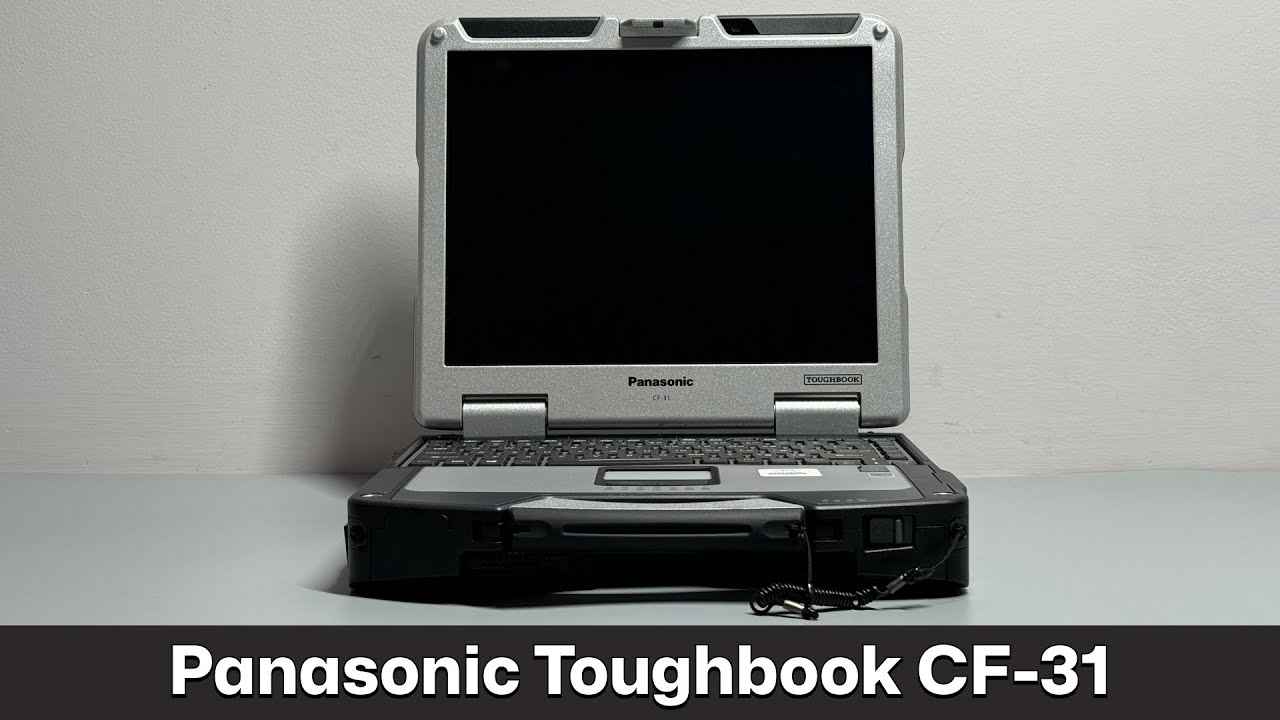
Organizations do not always need the newest computer to support field operations. Some need a proven device that can withstand vibration, dust, moisture, drops, and frequent transportation. A refurbished Panasonic Toughbook CF 31 laptop may remain a practical choice when physical durability, legacy equipment compatibility, and purchase cost matter more than having the latest processor or a lightweight design.
Why Do Organizations Still Consider the CF-31?
The Toughbook CF-31 was designed as a fully rugged computer rather than an ordinary business laptop with added protective features. Its substantial chassis, carrying handle, protected connections, and field-oriented design made it suitable for police vehicles, utility work, industrial facilities, repair operations, and other demanding settings.
Because many units were originally built for institutional and commercial fleets, refurbished models continue to enter the secondary market. These computers may offer considerable physical protection at a lower purchase price than a current fully rugged model.
However, age alone should not determine whether the CF-31 is a good or poor choice. Buyers must compare the exact unit’s condition and specifications with the software, security, mobility, and connectivity requirements of the intended job.
What Type of Protection Does the CF-31 Offer?
The CF-31 was built with a magnesium-alloy case and features intended to protect internal components from rough handling. Different generations were marketed with MIL-STD-810G testing and an IP65 rating.
MIL-STD testing may cover conditions such as shock, vibration, temperature changes, humidity, altitude, and drops. An IP65 rating indicates protection against dust intrusion and resistance to water jets under defined test conditions.
These ratings do not mean that every used CF-31 remains in its original condition. Port covers, seals, hinges, handles, and case components may wear over time. Buyers should inspect these parts or purchase from a seller that evaluates the physical condition of each computer before resale.
Which Work Environments Suit This Computer?
A Panasonic Toughbook CF-31 laptop may be appropriate when the computer will remain in a vehicle, workshop, factory, maintenance facility, or other setting where weight is less important than durability.
Potential applications include:
- Vehicle diagnostics and equipment programming
- Utility maintenance and infrastructure inspections
- Fleet management and dispatch operations
- Public safety reporting
- Manufacturing equipment monitoring
- Field data collection
- Warehouse and yard operations
- Construction equipment support
The CF-31 weighs considerably more than a typical modern notebook. Employees who carry a computer for several hours may prefer a lighter semi-rugged model or rugged tablet. The CF-31 is often better suited to mounted, vehicle-based, or short-distance mobile use.
How Much Performance Does the Job Require?
The CF-31 was produced in several generations, sometimes identified by Mark or MK numbers. Processor, memory capacity, graphics, wireless hardware, and other specifications vary among these versions.
Later configurations may include Intel Core i5 or Core i7 processors, while earlier units may use older hardware. Refurbished sellers may also replace the original drive with a solid-state drive and increase the installed memory.
Before purchasing, compare the exact processor, RAM, and storage capacity with the software’s published requirements. A CF-31 may handle diagnostics, reporting, records, mapping, inventory, and other established programs, but it may not be suitable for demanding current applications or workloads that rely heavily on modern graphics.
Is the Display Suitable for Outdoor Work?
The CF-31 uses a 13.1-inch display with a 4:3 aspect ratio. This screen shape can work well with older diagnostic, dispatch, and industrial programs designed around more square display formats.
Certain configurations include a touchscreen and features intended to support viewing in bright conditions. This can help employees who work outdoors or move between a vehicle and direct sunlight.
Screen condition should be checked carefully on a refurbished unit. Buyers should look for pressure marks, discoloration, dead pixels, touchscreen problems, and worn protective layers. They should also confirm whether the display and input method match the software employees will use.
Can It Connect to Existing Field Equipment?
One reason organizations retain legacy rugged computers is their connection support. Industrial machines, vehicle diagnostic tools, radios, measurement equipment, and public safety systems may require ports that have disappeared from newer consumer laptops.
Depending on its configuration, a CF-31 may include USB, Ethernet, serial, VGA, and other connections. Some versions also support GPS, mobile broadband, smart card readers, or fingerprint readers.
Never assume that every unit includes the same ports or wireless hardware. Review photographs and the full configuration before ordering. Buyers should also confirm whether older mobile broadband hardware remains compatible with current carrier networks.
What Should Buyers Know About the Battery?
Battery health varies widely among used computers. An original battery may hold far less charge than it did when new, even if the laptop itself functions correctly.
Ask whether the battery has been tested, what runtime the seller expects, and whether replacement batteries are available. If the computer will remain in a vehicle or workstation, a compatible power adapter or dock may reduce dependence on battery runtime.
Organizations buying several units should include batteries, chargers, and replacement planning in their total equipment budget.
Are the Operating System and Software Still Supported?
Software compatibility is one of the most important checks when purchasing any legacy computer. Buyers should verify whether the installed operating system still receives security updates and whether required drivers are available.
The chosen operating system must also support the organization’s applications, security tools, device-management software, and network policies. In regulated or security-sensitive environments, technology staff should approve the proposed configuration before the computer is deployed.
A physically durable laptop is not a suitable purchase if its operating system cannot meet current security requirements.
What Defines a Good Refurbished Unit?
A quality refurbishment should involve more than wiping the exterior and reinstalling an operating system. Buyers should ask whether the computer has been tested for memory errors, storage health, charging, keyboard input, touchscreen response, ports, wireless connections, and physical damage.
The listing should clearly identify the processor, memory, storage, battery condition, included accessories, operating system, cosmetic grade, and warranty. To compare available CF-31 configurations and find a field computer suited to your equipment and software requirements, visit Tough Rugged Laptops before making your purchase.
